
Who this is for
If you’re responsible for how products actually show up in-store—not just how they’re reported—this guide is for you.
This guide is built to bridge that gap—between what the data says and what’s actually happening on the shelf.
Sales and execution teams use the same words every day—POG, OOS, facings, resets. But those terms don’t always translate clearly into what’s actually happening in-store.
A product can be “in stock” but not truly shoppable. A display can exist but goes unnoticed. And a planogram can be corrected on paper but poorly executed on the shelf.
This guide breaks down the most common retail and merchandising terms—and more importantly, what they look like in real store conditions.
Shelf execution fundamentals
Planogram (POG): A planogram is a visual layout that shows exactly where products should be placed on shelves. Following the POG correctly helps prevent rework, but even small deviations—like misplaced SKUs or inconsistent spacing—can reduce visibility and impact sales.
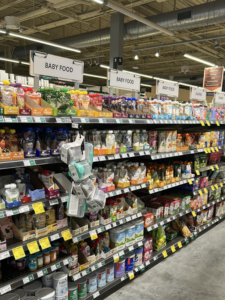
Survey partnered with Baby Life at Whole Foods. Planogram example showing shelf layout.
Modular (MOD): MOD can have two meanings depending on context:
The meaning usually depends on the question. If it refers to a person, it’s the manager. If it refers to shelving or photos, it’s the modular section.
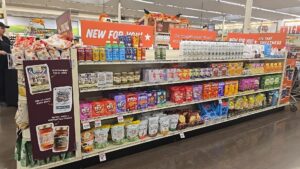
Survey partnered with BjornQorn at Sprouts. Modular example showing a defined shelf section.
Facing: A facing refers to one visible unit of a product on the shelf. It can also refer to the act of pulling products forward. More facings increase visibility. Fewer facings—even with inventory available—can reduce conversion.
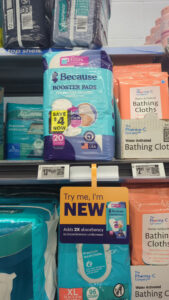
Survey partnered with Because at CVS. Facing example showing product fronting.
OOS (Out of stock): OOS means a product is missing from the shelf, even if the label or space is still there. In reality, products may still exist in back stock or top stock—but from the shopper’s perspective, they are unavailable.
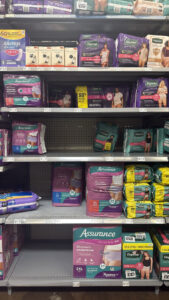
Survey supported Because with OOS recovery. Before example showing out-of-stock conditions.
Turn definitions into a checklist
Knowing the terms is one thing—spotting issues in-store is another.
Talk with our experts: What to look for in every store visit
Store and environment terms
Big box store: Large-format retail stores with high product volume and wide aisles (e.g., Walmart, Target, Home Depot). These environments require consistent execution at scale due to the number of SKUs and shelf space.
POS (Point of sale): The checkout area where customers complete purchases, including registers and self-checkout. This is also a key area for impulse displays and front-end merchandising.
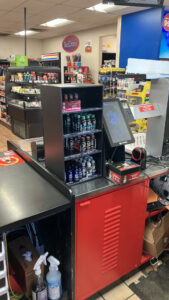
Survey partnered with Max Distributing at Circle K. POS display example.
Inventory and stocking terms
Back stock and top stock:
Both support replenishment, but if products remain there too long, they never reach the shelf.
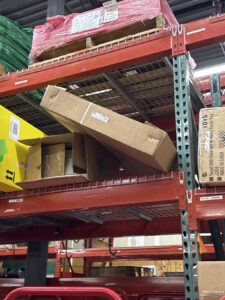
Survey partnered with Bubble at Target. Back stock example (stored inventory).
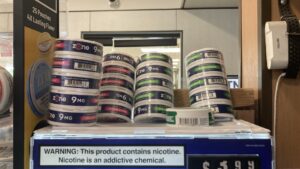
Survey partnered with ZEO at 7-Eleven. Top stock example.
Phantom inventory: Inventory that appears in the system but cannot be physically found in the store. This creates a disconnect between reported availability and actual shelf conditions.
See where your data and reality might not match
If you’ve ever seen “in stock” but couldn’t find the product on the shelf, you’re not alone.
Explore: Common Execution Gaps That Impact Shelf Performance
Display and shelf terms
Gondola: The main shelving unit that runs down an aisle.
Endcap: A display located at the end of an aisle, designed to increase visibility.
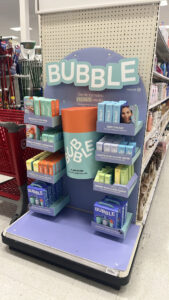
Survey partnered with Bubble at Target. Endcap display example.
Sidekick: A small display attached to a shelf or endcap, often used for cross-merchandising.
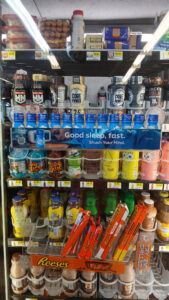
Survey supported Dream Water at GPM. Sidekick placement example.
Side cap / FEM (Front-end merchandising): Displays located on the side of an endcap or near the checkout area. These are high-visibility placements and are often included in audits and reset projects.
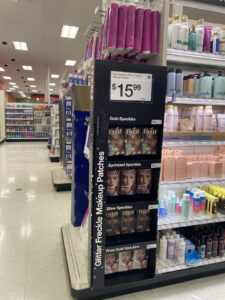
Survey supported Fazit Beauty at Target. Side cap execution example.
Sky shelf: A shelf located above the main selling area, often near the top of fixtures or coolers. Products placed here may be for display or overflow stock, but they are not always easily accessible to shoppers.
Prioritize the stores that actually need attention
Not all execution issues are visible in reports—and not all stores need the same level of support.
Learn how teams identify:
Merchandising and project terms
Reset: Reorganizing shelves or displays according to a new planogram.
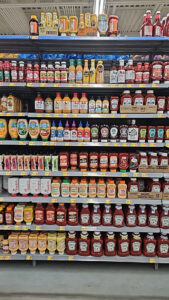
Survey partnered with Chosen Foods at Walmart. Reset merchandising support.
Pack out: Filling shelves using inventory from back stock or top stock.
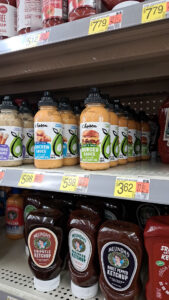
Survey partnered with Chosen Foods at Walmart. Pack-out example improving shelf presence.
Audit / photo audit: Collecting photos and verifying store conditions without making changes. Audits help identify issues, while resets and pack outs help resolve them.
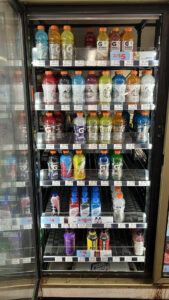
Survey partnered with Come Ready Foods. Photo audit example across retailers.
Product and pricing terms
Knowing the terms isn’t enough
Understanding retail terminology is a starting point, but it doesn’t solve execution challenges on its own.
A shelf can follow the planogram and still underperform. Inventory can exist but remain unsold. Displays can be present but not drive visibility.
The gap often comes down to what’s actually happening in-store versus what’s assumed based on data.
Where better visibility changes outcomes
Retail execution improves when teams can clearly see and act on in-store conditions.
That includes:
When these signals are visible, teams can move from reacting to performance issues to addressing them directly at the shelf.
Move from definitions to action
Understanding merchandising terms is the first step—but improving performance means knowing what’s happening in-store, at scale.
See how teams go deeper:
Request a walkthrough of how teams connect shelf conditions to performance outcomes
Final thought
Retail terms are meant to simplify communication, but they can also create blind spots if taken at face value.
Understanding how these terms show up in real store conditions helps teams align data with reality—and improve performance where it matters most.
Learn how Survey helps brands win at retail →